Disaster Recovery Strategy
Disaster Recovery is the process of preparing and recovering on unexpected events that prevent website working normally. Those events can be electronic outage, human failures on resources, hardware failure or malware from hacker. This requires a secondary infrastructure run and handle traffic while we are fixing the primary infrastructure.
Normally, almost resources in AWS support high availability in multiple Availability Zone in same Region. For example, when you deploy a Application Load Balancer, you can select to deploy on every AZ in Region, and when one AZ is outage, the ALB is still available on other AZs. When you work with Auto Scaling Group, if on AZ failed, ASG will spin up new instances on other AZs to reach the desired capability.
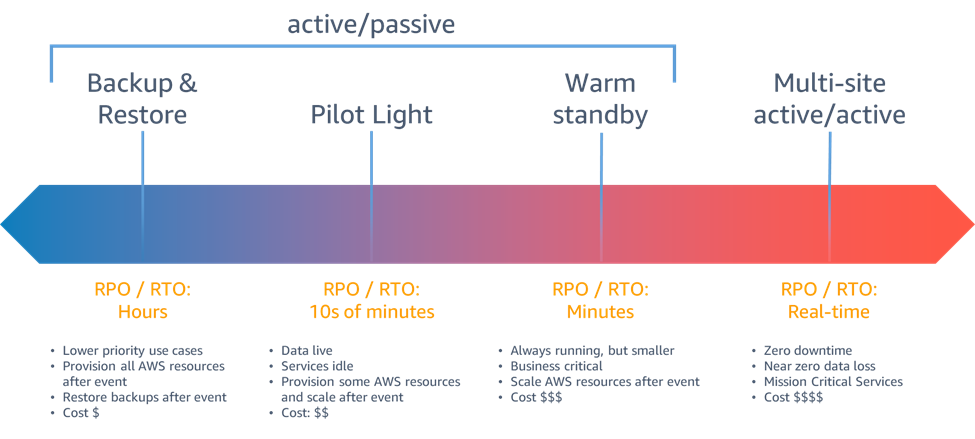
AWS categorized disaster recovery strategies into 4 approaches:
- Backup and Restore: you have a scheduled backup your project data such as databases, file storages. And then you restore those data into a new infrastructure.
- Pilot light: you will have database available but no compute resource to serve the traffic
- Warm Standby: you run a low capability to make sure the system can handle small traffic and scale out gradually
- Multi site Active/Active: You clone the primary infrastructure and just need to switch the traffic
This section will introduce a Backup and Restore strategy by leverage AWS services managed replication and CloudFormation StackSet to deploy services in 2 Regions.
- Turn on replication on S3 and ECR
- Deploy another ECS cluster with desired service tasks is 0
- Deploy an idle ALB
If a disaster occurs, I will increase ECS desired task count and manually change the Route53 to the secondary infrastructure.
Setup Elastic Container Registry replication
We will create a CloudFormation ECR nested stack which only create on Primary Region with Condition option in template
Conditions:
  IsPrimary: !Equals [!Ref AWS::Region, ap-southeast-1]
Resources:
...
    ecrStack:
    Type: AWS::CloudFormation::Stack
    Condition: IsPrimary
    Properties:
        TemplateURL: !Sub https://${BucketName}.s3.${AWS::Region}.amazonaws.com/stacks/ecr.yml
        Parameters:
        RepositoryName: ws02
        SecondaryRegion: ap-northeast-1
...
This CloudFormation template create a ECR repository to store docker images and a ReplicationConfiguration with the rule filter on repository name and destination is the region in the same account.
Resources:
  Ws02Repository:
    Type: AWS::ECR::Repository
    Properties:
      ImageTagMutability: IMMUTABLE
      RepositoryName: !Ref RepositoryName
      ImageScanningConfiguration:
        ScanOnPush: true
  ECRReplication:
    Type: AWS::ECR::ReplicationConfiguration
    DependsOn: Ws02Repository
    Properties:
      ReplicationConfiguration:
        Rules:
          - Destinations:
              - Region: !Ref SecondaryRegion
                RegistryId: !Ref AWS::AccountId
            RepositoryFilters:
              - Filter: !Ref Ws02Repository
                FilterType: PREFIX_MATCH
Initiate CloudFormation StackSet
CloudFormation help you deploy infrastructure to multiple regions quickly and centralize the stack. CloudFormation StackSet support input parameters for each stack, but you can also override parameters for specific region in the StackInstancesGroup configuration.
  ECSStackSet:
    Type: 'AWS::CloudFormation::StackSet'
    DependsOn: VPCStackSet
    Properties:
      StackSetName: ws02-ecs
      Description: ECS stack set on Singapore and Tokyo
      PermissionModel: SELF_MANAGED
      ExecutionRoleName: AWSCloudFormationStackSetExecutionRole
      Capabilities:
        - CAPABILITY_IAM
        - CAPABILITY_AUTO_EXPAND
      ManagedExecution:
        Active: true
      Tags:
        - Key: test
          Value: true
      TemplateURL: !Ref ECSTemplate
      Parameters:
        - ParameterKey: VpcStackExportPrefixName
          ParameterValue: ws02
      OperationPreferences:
        FailureToleranceCount: 0
        MaxConcurrentCount: 1
        RegionConcurrencyType: PARALLEL
      StackInstancesGroup:
      # Primary region
        - DeploymentTargets:
            Accounts:
              - !Ref AWS::AccountId
          Regions:
            - ap-southeast-1 # Singapore
      # Disaster region
        - DeploymentTargets:
            Accounts:
              - !Ref AWS::AccountId
          Regions:
            - ap-northeast-1 # Tokyo
          ParameterOverrides:
            - ParameterKey: BucketName
              ParameterValue: tvm-cf-templates-tokyo