ECS Introduction
ECS is an AWS managed Container Orchestration that makes it easy to deploy, manage, and scale containerized applications. ECS is integrated with a number of 3rd party tools such as ECR and Docker to help the team focus on application development rather than setting up the environment. You can create and run applications across multiple Regions, on-premise without worrying about controls.
ECS Architecture
ECS includes 3 layers:
- Capacity - system where you deploy containers, it can be EC2, Fargate or on-premise
- Controller - the AWS management section helps deploy and manage containers
- Provisioning - tools to interact with the controller: Console, CLI, SDK, Copilot, CDK
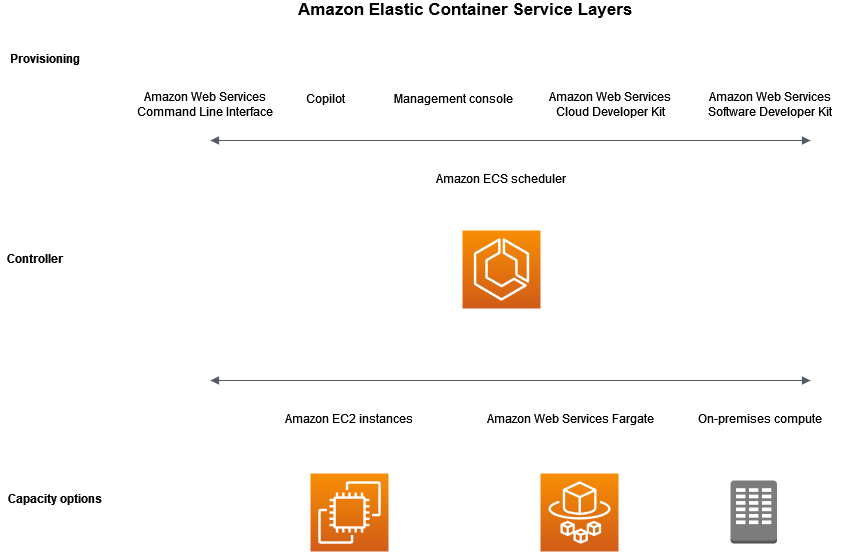
For Capacity layer, ECS provides 3 options: EC2, Fargate and On-premise. Depending on your needs and purposes, you can choose the appropriate capacity:
| Specification | Advantage | Disadvantage | |
|---|---|---|---|
| EC2 | Using AWS EC2 service to run virtual machines containing container applications | Optimizing costs when the system is operating stably | It takes effort to operate, monitor, and upgrade the system |
| Fargate | Be a Serverless container service that AWS manages the system | No need to worry about the underlying system, great scalability | The price is higher when using EC2 |
| On-premise | connecting servers outside of AWS, for specific purposes |
Application Lifecycle
The following show how a container application works with ECS:
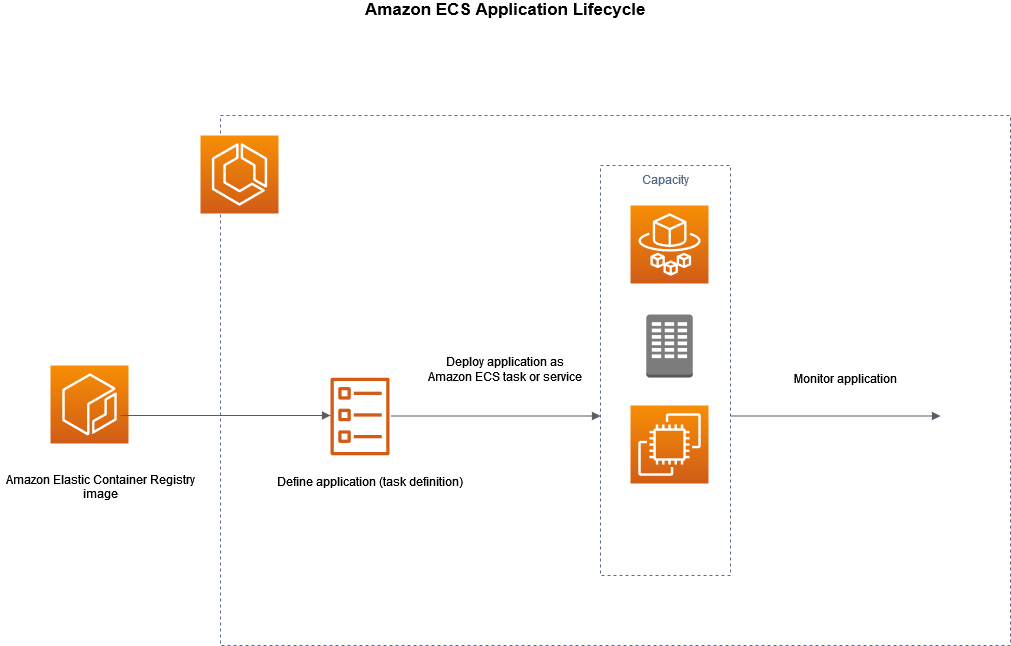
1 Your application must be packaged into Docker images, which can be stored on ECR or some docker registry so that ECS can access it to download the Docker image. 2 After having the image, you need to create a Task definition, which is a draft for installation configuration such as: image information, OS parameters, used port, storage, connection parameters, … 3 To deploy containers, you create a Service/Task in the clusters. Cluster is understood as services or tasks grouped together and operated on Capacity Providers registered with it. The cluster will read the task definition and deploy the corresponding containers. You can run multiple tasks using the ECS service to maintain and ensure the number of tasks running simultaneously in the cluster.
In addition, for EC2 Capacity, ECS will need to have a container agent on each server with the purpose of sending information about tasks, container resource usage to run and shut down tasks as well as monitor system parameters. system.
Once the container is up and running, you can monitor deployments and applications using tools supported by AWS: CloudWatch, Runtime Monitoring.
Cluster
Cluster is a group of related tasks or services that can be functional or your entire project, it includes:
- Infrastructure can be a combination of EC2, Fargate and on-prem.
- Configure network in 1 VPC
- Connect to Namespace to support communication between services inside and outside the cluster.
- Choose to monitor using Container Insight to collect, synthesize and summarize parameters and logs.
Cluster includes many capability providers, which can be understood as a group of independent server systems with the same specific configuration and scalability, which can be an Auto Scaling Group, Fargate provider.
| Fargate | EC2 Auto Scaling Group |
|---|---|
| Manage tasks using Fargate or Fargate Spot (Fargate service has discounts but is not stable). This provider has some limitations in terms of OS support and Console operations. | Cluster provides automatic management of the number of instances in the group and the expansion process to meet the needs of services |
Task definition
It is a template that helps configure parameters to deploy 1 or more containers in your ECS cluster, a parameter can be changed as:
- Launch type: determines what type of provider the application will run on
- Docker image information
- Necessary CPU and memory parameters
- Server operating system
- Network mode used to connect to containers
- Task condition executes a certain task and turns itself off
- IAM Role helps interact with other AWS services
- Configuring logging and storage
After initialization, Task definition can be applied in 2 forms:
- Task: is a container to execute a specific task and automatically shuts down after completion
- Service: is a mechanism for managing containers, helping to ensure the desired number of containers is executed. If a task is detected to be faulty, ECS’s schedular service will execute a mechanism to create a new task to replace it and shut down the faulty task.
task’s network mode is used to configure container communications, especially when running in EC2 instances. If there are no specific requirements, AWS recommends using awsvpc mode:
- For Fargate, you can only configure awsvpc mode
- With EC2, you have more modes and awsvpc simplifies network configuration so you only need to focus on application development.
The lists the network modes
| Mode | Description |
|---|---|
| awsvpc (default) | The task is allocated an ENI and a IPv4 address, which allows the task to have the same network characteristics as the EC2 instance |
| bridge | Use the default docker network of the docker service running in the instance |
| host | The task will bypass the Docker network to map the container port directly to the ENI of the EC2 instance. This controls that identical tasks cannot be deployed on the same instance |
| none | Task will not receive connections from outside |
Deploy an application to an ECS cluster
ECS supports application deployment in 3 options:
- Rolling update: managed by ECS using service scheduler
- Blue/Green: combined with CodeDeploy service
- External: use 3rd party services to call API
When using the Console to create a service, AWS will default to the rolling update option and related configurations to create the service. You can change the options in the Deployment options section
Rolling update
This is an option for ECS to manage application deployment. When you make service changes and activate deployment, the service scheduler will stop creating a number of new tasks and can turn off some old tasks according to your regulations. After the new task is in a stable state, ECS will completely shut down the old tasks and the process is complete. If you deploy the service in conjunction with an ELB, after the task is ready to receive traffic, ECS will automatically register the task with the ELB to gradually transfer traffic to the new task. Therefore, you need to pay attention to checking the health of the task to ensure the new service is ready to receive traffic.
You can configure deployment according to the following two parameters to specify the number of new and old tasks during deployment:
- minimumHealthPercent: minimum number of old tasks kept. For example, the value is 75% and there are 4 tasks, the service scheduler will turn off 1 task, keep 3 tasks and create a new task.
- maximumPercent: determines the maximum number of tasks for the service, including old and new tasks. For example, if the value is 200% and the desired number of tasks is 4, the service scheduler can create a maximum of 8 tasks, so it will create 4 new tasks running in parallel with the 4 old tasks.
When deploying the application, the Application may have errors leading to application deployment failure. ECS provides two methods to identify errors and rollback applications to old versions: circuit breakers and CloudWatch alarms. You can combine both methods to best identify errors for your application.
- Circuit breaker: ECS will evaluate the status of each task and stop deployment when the number of errors reaches a certain threshold.
- CloudWatch Alarms: evaluated based on application parameters. ECS will monitor the alarm parameters you set in advance. When the CloudWatch parameter is in the ALARM state, ECS will rollback your application.
Blue/Green with CodeDeploy
This option is combined with the CodeDeploy service to manage and monitor the deployment process. With this option you will have more options in distributing traffic between new and old tasks according to the following 3 types:
- Canary: transfer part of the traffic to a new task and after a certain period of time, transfer all remaining traffic to the new task
- Linear: transfers traffic gradually over time. For example 20% every 5 minutes
- All-at-once: after new tasks have stabilized, transfer all traffic at once
Some considerations when using Blue/Green:
- You need to create a few resources inside the CodeDeploy service and link them to ECS.
- ECS needs to create an additional task set component to configure the deployment process, increasing the complexity of configuration.
- Must connect to a load balancer to be able to regulate traffic distribution
- This process will conflict with expansion leading to unforeseen results. Therefore, it is necessary to avoid deployment when the system is under heavy load.
External
ECS provides APIs to integrate with 3rd party services that control and monitor the deployment process, such as Jenkins,…
service auto scaling
This is the ability to automatically increase or decrease the desired number of tasks. ECS leverages the Application AUto Scaling service to provide this feature. ECS will publish CloudWatch metrics about your service’s CPU and memory usage, and you can use these metrics to scale your service. Application Auto Scaling supports the following 3 types of scaling:
- Target tracking metric - Increase or decrease the number of tasks based on a certain parameter. The mechanism is similar to how a thermometer works, ensuring that service parameters remain at a level less than or equal to a certain number.
- Step scaling - changes the number of tasks by a series of scaling adjustments based on the size of the warning breach. For example, if it exceeds 20%, it will add 1 task, if it exceeds 50%, it will increase 3 tasks.
- schedule scaling - changes based on time. For example, run 5 tasks during the day and 1 task at night.
service-to-service connection
One of the considerations when using ECS is how to connect to services within the cluster. For access from the internet, you can combine it with an Elastic Load Balancer. And when you want this connection not to go outside the internet, you can use the internal connection feature using Service Connect or Service Discovery.
- Service Connect
Use this method to provide service-to-service connectivity by setting up a service discovery and service mesh to create a network for the cluster. The highlight of this feature is that it uses service mesh to manage the network and can instantly switch connections to services in good status when a service fails.
- Service Discovery
This is a traditional way of connecting, it will create a DNS system to save the IP of each task and attach it to a specific domain name. Because these DNS IPs will be cached every time they are queried, when a task fails, the service needs to wait until the cache is valid and query the latest DNS information before it can continue to be used. A highlight of this system is that it allows you to connect to the service from outside the cluster. For example, you can call the service from an EC2 instance that is not on the same network.